All Posts By

Angela Korra'ti

About Me

Forthcoming nasal surgery for me! Joy!

It’s somewhat tiresome that I’ve had enough surgeries in my life now that I can go “oh goody I get to have another surgery!”

But yeah. I do. Joy! At least this time, though, it’s not cancer. It’s a deviated septum.

What brought all this on is that for some years now, I’ve had chronic congestion issues, sinus infections, post-nasal drip, and etc., all of which I’d thought for ages were just due to allergies. But last year I was tested for allergies, and came up negative on all the things on the standard battery of allergy tests. The doctor at the time put me on Montelukast, a.k.a. Singulair, which did help my symptoms some but didn’t get rid of them. I’ve also had this ongoing annoying issue with what seems to be pulsatile tinnitus in my right ear, which appears to be aggravated when my congestion problems are pronounced.

And I’ve had general issues just breathing through my nose. I have been paying attention this year, and have observed that I have to consciously think to breathe through my nose at any given time, particularly if I’m out on my daily commute. Even walking along level ground like the stretch of Elliott that takes me to Big Fish. But it’s more pronounced if I’m going up an incline, like the hill to our house.

I noticed this as well when I was at the dentist the other day having crown work. In my experience they generally tell you to breathe through your nose while they’re working on your mouth–only in my case, I actively have problems doing that. And I have noticed breathing issues when trying to play my flutes and whistles, which is particularly annoying and I have wondered if this has been contributing to my general inability to get through “Morrison’s Jig” without having to breathe in weird places. (And “Morrison’s” is NOT a tune you want to fuck up the flow for, that’s for sure.)

With all this going on, my primary care doc has had me on a nasal spray (Azelastin, a.k.a. Astelin). I’ve been doing a lot of saline rinses as well. And I’m on a stupid number of antihistamines, usually taking both Allegra and loratadine in the morning, and Benadryl at night. I’ve had to use Breathe Right strips to try to keep my nasal passages open well enough that I can actually sleep, and minimize the amount of snoring that’s been bothering Dara.

So a few weeks ago I had another incident of what seemed like a sinus infection. But when I went in to have that looked at, the doctor told me he didn’t see any signs of infection, though he did see inflammation in my nose and ear. Between that and also noting one of my favorite authors earlier this summer posting about having nasal surgery, I told the doctor who saw me that I had been thinking of having a conversation with my primary care physician about moving forward with longer-term solutions. That doctor went ahead and scheduled me for a scan of my sinuses.

I went in for that, and the results came back “deviated septum”.

Today, I went and saw the specialist, who showed me the actual pics from the scan. The good news is, the sinuses looked normal, with no signs of infection. The not so good news is that boy howdy is my septum crooked. 50 percent deviation, the specialist told me. And, looking at the scans, I could really tell how the left passage was significantly collapsed.

We talked about my turbinates as well, and discussed that those are the bits of my nose that are pulled wider apart when I’m using the Breathe Right strips. Her recommendation was that we take a millimeter or so off of both of those. But that gets more into exterior-type work, vs. fixing the septum. She specializes more in septum/interior work, so she’s sending me over to talk to a second surgeon who would be the guy who does the turbinates and making sure the nose is okay externally as well. Once I have that consultation, then we’ll nail down when the actual procedure happens.

Meanwhile I’m also going to have an MRI to see what’s going on with my ear, since the specialist said that in her estimation that’s probably a different issue, maybe a blood vessel that’s pressed up against my eardrum or something of that nature. A scan will get us more data to work with.

So all this is fun in that “oh goody more surgery YAY?” kind of way, but at least on the scale of Reasons I Have Had to Have Surgery in my life, this isn’t nearly as annoying as stage 0 cancer. Even if I am a little paranoid about my history of having portions of my anatomy scanned only to have it lead to “OH HEY LOOK WE FOUND A THING THIS NEEDS TO COME OUT NOW”.

Dara, naturally, had to start quoting “Sad Muppet” at me (“VOLDEMORT! HAS NO NOSE!”). And I’ve got Rimmer from Red Dwarf in the back of my head going “Of course, she had an artificial nose. Tastefully done. Quality metal. No rivets!” (The season closer of Series 2 of Red Dwarf, “Parallel Universe”, if you’re trying to remember the episode!)

‘Cause joy oh glee, I get to have a nose job. I’m pretty sure there won’t be any rivets involved.

More details as I have ’em!
Main

Tech review: iOS 10, by Apple

As y’all know, I’m an Apple user of many years at this point. I’m on my second Macbook computer since 2007, and my third iPhone since 2009. And since fairly tech-savvy, I tend to jump on OS upgrades as they happen. This week, with the release of iOS 10, was no exception.

And, as I’ve posted both here and on my social media accounts, by and large I’m happy with it. With the one big glaring exception that the redesigned Music app is an unholy mess and I would now like to shoot it into the sun. Go see that post for details on that, as well as a few initial observations on a couple of alternative apps I am exploring.

This post is about everything else, assorted observations I made through the process of installing the update on my phone and my iPad, and while using it today on the phone on my commute.

Dara’s best reaction to my live updates:

https://twitter.com/annathepiper/status/775894787694002176

I do indeed figure that any OS update that does not result in my device exploding is probably a win.

During Setup

iOS apparently has two-factor authentication now for logging into your iCloud account. This is a good thing. I approve.

I also noticed that it offered to add the credit card I already had on file with Apple for buying music and such to Apple Pay. I have no fucks to give about Apple Pay but went ahead and let it do this anyway. I may want to test this at some point.

No More Sliding to Unlock

I may be one of the few iOS users on the planet that doesn’t really care about the widgets on the lockscreen. I’m a little sad that “slide to unlock” has become extinct now, because iOS 10 wants you to swipe left to get to widgets, and swipe right to get to the camera. Both of which seem fine to me from a usability standpoint, but I’m tellin’ ya, it’s going to take me a while to get over the muscle memory of needing to swipe left to unlock the phone.

I have an iPhone 6, not a 6s or later, so I don’t get to have the shiny new Raise to Wake functionality. But it is pretty nifty to be able to unlock the phone via Touch ID. Which, come to think of it, I was able to do in iOS 9, I think. I just never ever actually realized that before.

Still, though, this is what it looks like if I swipe left now from my lockscreen.

Widgets! Yay?

Widgets! Yay?

Overall Design

A bunch of font changes all over the place, but aside from the ones in the Music app, so far I’m not seeing anything to annoy me. All of my various apps still look pretty much the same, and none of them appear to have broken. So at least from a design perspective, iOS 10 doesn’t look particularly different from iOS 9 except in the Music app. Nothing here for me to hate, but nothing to get excited over either.

And I’m a little surprised to have found only one new system wallpaper I didn’t recognize. Apparently wallpapers are not something about which iOS 10 concerns itself. I’m a little sad about that, too, because sometimes I do use the system wallpapers. They tend to be a bit better at not making it too hard to read the labels on my apps.

Performance

There does appear to have been a noticeable boost in performance on my devices. Uploading a photo to Facebook and Twitter over the house wifi was smokin’ fast, and even pretty speedy over phone connectivity as well.

Bluetooth

My Jabra Move headphones seem like they’re connecting faster to the phone now, and during the course of today as I played music and podcasts, they held up pretty well. But they started flaking out on me partway through the afternoon, and I’m not sure yet whether that’s the fault of the new OS, or the fault of the headphones maybe running low on battery. I didn’t hear them fire off a low battery warning, so I’ll have to keep an eye on that over the next few days and see if the problem recurs.

Mail

There’s a new filter icon in the Mail app, down in the lower left hand corner, that lets you zoom in on just the unread messages in the mailbox you’re looking at. I don’t know if I’ll find this useful yet, but it seems like something that might be useful to me at some point.

App Deletion

I’m a little vexed that the touted ability to delete the stock apps you don’t find useful is deletion in name only–you can just blow away the icons off the home screen, vs. actually deleting them off the device and therefore freeing up space. But still, I’ll take it. Fewer icons to have to keep track of is nice.

All in All

This doesn’t feel like a particularly revolutionary upgrade to me, and the only thing that’s blatantly different amongst the stuff I actually use and care about, i.e., the Music app, is a significant step downward.

I do not care at all about the new emojis, or the added functionality in the messages app. I certainly don’t care about app functionality within messages. And as I mentioned up at the top of this post, I don’t particularly care about the widgets on the lockscreen either. Since I have a 6, I don’t have the 3D Touch capability that’s supposed to be what makes these widgets so awesome. Y’all will have to look to reviews written by people with newer devices than mine, I think, to get more deets on that. (Try Ars Technica’s comprehensive review, maybe?)

On the other hand, my phone’s general performance does feel faster. I’m seriously disgruntled about the Music app being a dumpster fire now, enough that I’m looking for alternative music apps. But that’s not enough to make me sad that I did the update in general. As Ars Technica says in the headline of their review, if you’ve got a reasonably new device, there’s no particular reason not to update.

(If you’ve got an older device, note also that Ars Technica has an entirely separate post about iOS 10 on the iPhone 5 and 5c, so that might be worth a read to you.)

So if you’re a technophile like me and willing to dive in headfirst to a new OS upgrade, go for it; just be aware of the issues with the Music app. If you’re more conservative though and prefer that a new OS release go through a few cycles of bugfixes, there’s nothing hugely groundbreaking here that I see to argue you out of that.

Final rough grade in general: B+
Final rough grade for the Music app in particular: D-

Main

The default Apple Music app is now even more of an unholy mess!

I installed iOS 10 on my iPhone 6 and iPad Air 2 last night, and I threw off a lot of tweets and posts to Facebook to document various reactions and observations as I went. By and large I’m pretty happy with the upgrade, and I’ll be doing a separate general post about that.

This post, however, is about the unholy mess that the default Music app on iOS has become.

I’ve been cranky about it for some time. I didn’t like that they threw podcasts out into a separate app, but I put up with it. I liked even less that they threw audiobooks out into iBooks, which killed my ability to organize audiobooks in playlists. Why this is relevant: because I buy a bunch of Doctor Who audios from Big Finish, and i like to organize them by season and listen to them in order of release. Dara and I listen to these a lot on road trips. Lack of ability to properly use those playlists on the iPhone is very annoying. I have to keep a separate note active in the Notes app to track the order of the audios in question, on the phone.

But I was even grudgingly willing to put up with that.

As of iOS 9, though, the Music app’s design got deeply annoying. Some of this is because of Apple’s being bound and determined to hook people into the Apple Music service, about which I have zero fucks to give. But at least I can mostly turn the service-specific features off.

What’s more annoying to me, though, is how the app is making it more difficult to just play my music that’s right there on the phone. In iOS 9, they had a toggle button that you had to turn on if you wanted to just see the music on the device.

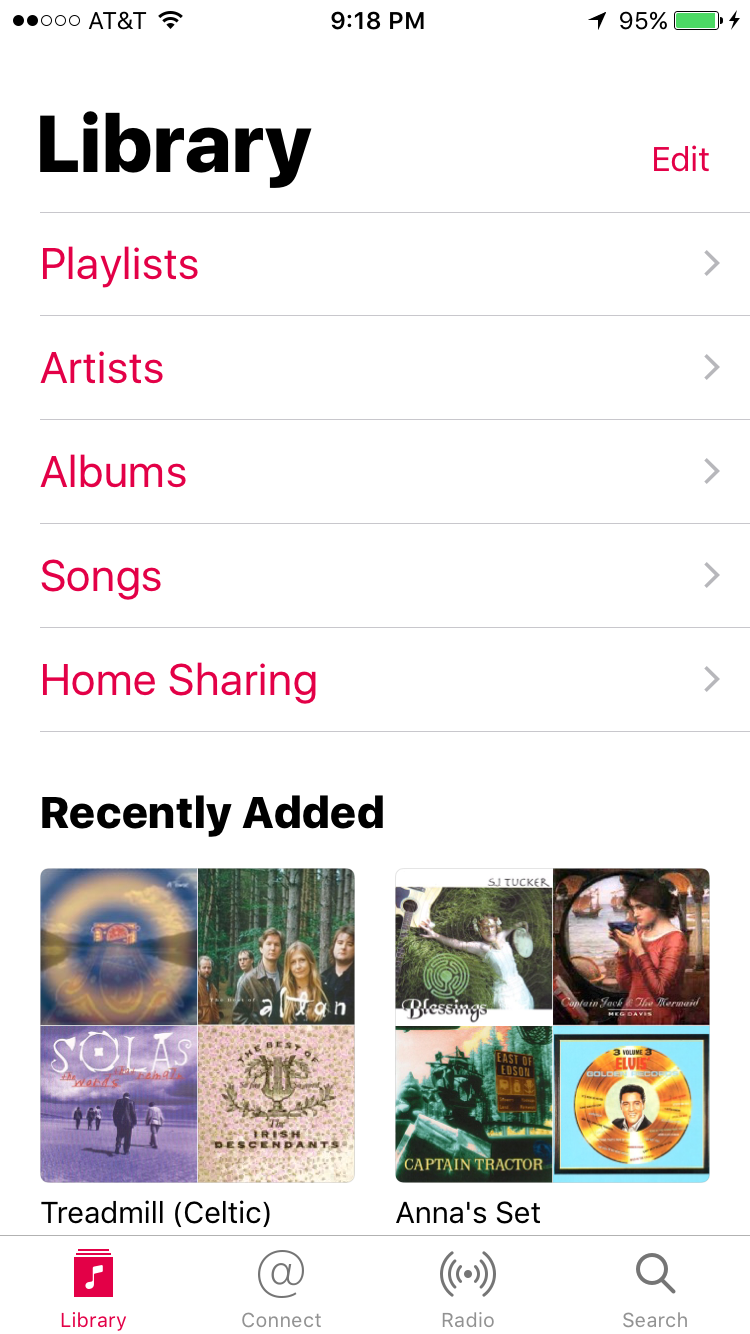
In iOS 10, however, they’ve now made a Downloaded Music section of your Library tab, entirely separate from the Playlists, Albums, Artists, and Songs items. The Downloaded Music section itself also has Playlists, Albums, Artists, and Songs. Which means that I have to completely ignore the top-level versions of those, because they are entirely useless to me, and instead have to tap down into Downloaded Music to get to the lists that are actually reflective of what’s on my device.

This is what that looks like on the phone by default. I had to actually turn on the Downloaded Music section, which does NOT appear by default, and scoot that up to the top so that I could actually get to it.

My Library tab in iOS 10 Music

My Library tab in iOS 10 Music

This is a UI decision that makes no goddamn sense to me. I was confused as to why the iOS 9 toggle button wasn’t over in Settings where it belongs, and I’m still confused about that. Since Apple seems bound and determined to make you try to use iTunes Match and Apple Music to play stuff, why they aren’t solving this problem by just putting the “Show Downloaded Music” toggle over in Settings, and keeping from cluttering up the Music app’s UI with redundant sections, is beyond me.

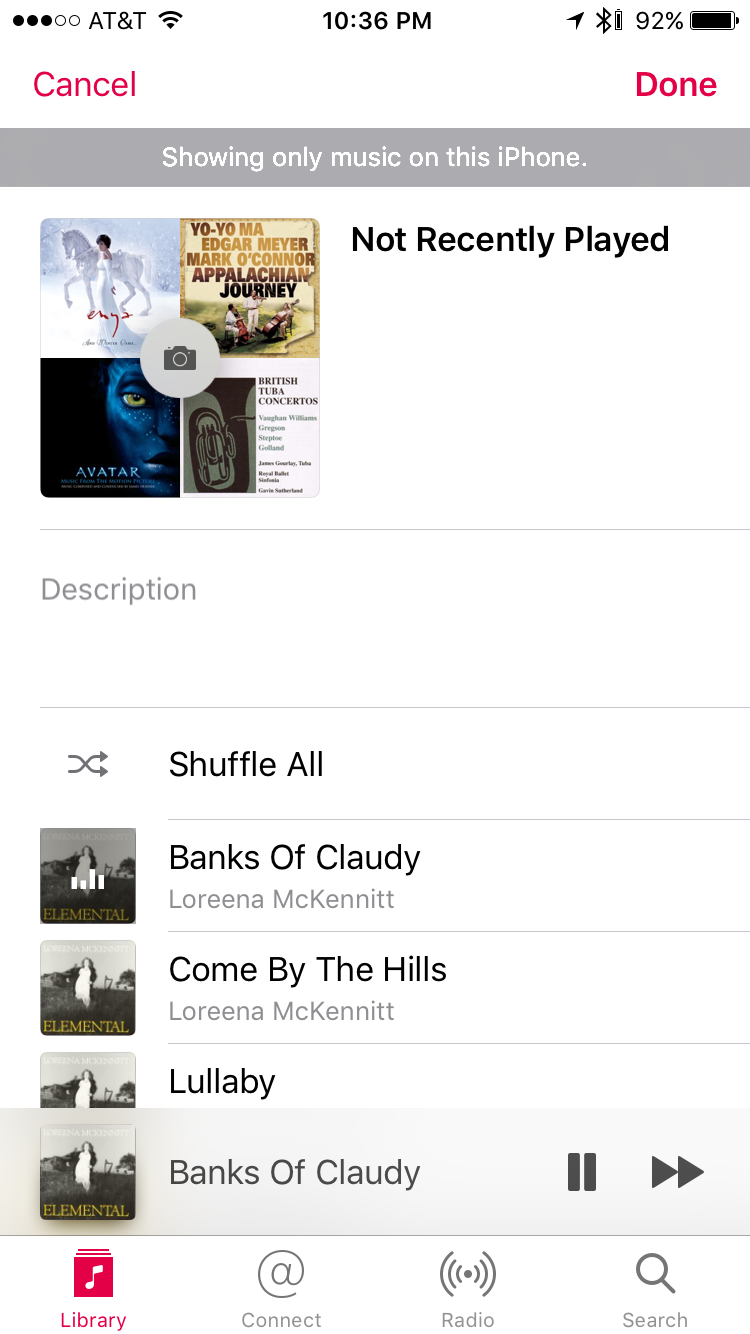
I am also highly disgruntled that they’ve made it a lot more difficult to see how many songs are on any given playlist. I use that data. It’s gone now from the top of a playlist, where it was in iOS 9. Which means that now there’s a bunch of whitespace they’re not using, underneath the playlist title. It looks like this.

Not Recently Played playlist

Not Recently Played playlist

My Not Recently Played playlist is the one I use most often, and it’s often got a lot of songs in it. I like to keep track of how many there are, and now, I have to scroll all the way down to the bottom of it if I want to see the song count. My best guess here is that they kicked up the font size on that data and decided it wouldn’t fit in the whitespace in question. But I don’t even know.

All in all, I’m grumpy enough about the state of the Music app that I’ve decided to start researching what alternative music apps are available. This MacWorld article from 2015 has a few recommendations, and Ecoute and Cesium both look promising. I’ll be checking them out.

Meanwhile, though, if any of you have recommendations for alternative music-playing apps on iOS, I really want to hear from you. I don’t need much in the way of bells and whistles. I just want an app that’ll be able to see my music collection as synced down from iTunes on my computer, and let me get at my playlists properly, including the Smart Playlists like Not Recently Played. I don’t want to stream any music; I don’t care about Apple Music, Spotify, Pandora, or anything else where the point is to stream music online. I just want to play the music I have.

Bonus if the app ALSO lets me play audiobooks in playlists.

Shoot me your recs if you got ’em! And stand by for the full iOS 10 review post.

Editing to add: I found another thing this afternoon that I strenuously dislike about the new Music app. To wit, they’ve removed the ability to see lyrics that you’ve manually attached to a song file. This is hugely irritating to me because a lot of what I listen to being Quebecois trad, I need the lyrics so I can learn them and practice my French.

Also, I have been poking at both Cesium and Ecoute today, the two most promising alternative music apps that I could find browsing around for suggestions.

I want to like Ecoute, in no small part because its name is in fact French. I like its simple, elegant UI. It even seems to let me actually get to the playlists for Big Finish audios like I want to.

But I don’t like that it doesn’t seem to actually honor the toggle setting for only showing me music local to the phone. That being broken means my Not Recently Played playlist is completely freggin’ useless in that app, too. And while it seems like it’ll see my podcasts as well, it’s having trouble organizing them; I see the same podcast splitting out into multiple icons.

Cesium, meanwhile, has a UI that looks like a nice retro throwback to what the iOS default Music app USED to look like. But it doesn’t seem to pick up on my audiobook playlists like Ecoute does. And my Not Recently Played playlist is less useful here, too. I can at least show music local to the phone properly, but Not Recently Played is a smart playlist. My intent with it is to have songs roll off of it when I play them, making the playlist automatically shorter. Cesium doesn’t seem to pick up on this, which makes it less useful in that regard.

And both apps have delivered the vexing surprise that apparently, third party apps can’t get at playlist folders if you’ve made those for organizational purposes, because apparently Apple doesn’t make those visible in the API. BOO.

Site Updates

Testing Jetpack crossposting, test, test, test

Since I was just over on the WordPress.com testing its crossposting functionality via Publicize, I thought that was pretty nifty and have learned that that’s available to self-hosted sites like this one, via the Jetpack plugin.

So this is me testing that! This should be going out to my Facebook, Twitter, Google+, and Tumblr accounts.

(I’m a little irritated that Jetpack apparently does not let you set up to crosspost to Facebook for both your personal timeline AND a page that you manage, which, y’know, is kinda what I need to do. So even if I decide to keep Jetpack around, I will still need Social. Not to mention the older functionality I’m using to throw posts over to Livejournal and Dreamwidth.)

Y’all please let me know if you notice anything weird about site functionality while Jetpack is active. When I turned it on, I suddenly got a huge wave of backlogged comment emails that Social should have sent me and didn’t. So there may be other unexpected side effects. Apologies in advance if anything breaks!

Main

Side effects of setting up a wordpress.com site

As I announced yesterday, I have now have a minimal backup version of my author site up on angelahighland.wordpress.com. I’m disgruntled that I have had to do this, and only somewhat reassured by having seen our city council put up this statement pertaining to our ongoing chronic outage problem.

But this does at least mean that now I’ve had a bit of direct experience setting up a site on WordPress.com. Which is useful experience to have, since it tells me things I can share with fellow authors who need to set up a site for their books.

Setting up the site is really easy

All you really need is an account on WordPress.com, to start with. Once you have one of those, when you’re logged in, there’s a “My Site” button up in the upper left part of their site. Clicking on that leads you to the setup wizard you can step through to get a site going. They ask you some basic questions about what your site will be about, so that they can give you a bit of guidance as to what default themes they will suggest for you.

This process includes choosing a theme, and choosing what level of site plan you want. Your options for the latter do include ‘free’, with varying tiers above that that cost different amounts of money depending on what level of service you want from them.

Assuming you quickly choose one of the offered default themes and you choose the ‘free’ plan, setting up your site is only a matter of a couple of minutes. This is even easier than setting up your own site with the code from WordPress.org.

Your site will however be limited in available functionality

If you’ve got any experience setting up your own self-hosted WordPress site at all, you will probably find the limitations on a WordPress.com site annoying. Specifically, you will not be able to install your own plugins. I get why this is the case–they are a commercial site, and accordingly, they need to lock down what they’ll let users install and what they won’t, for security purposes. But if you’re accustomed to the fine-grained level of control hosting your own site will provide you, this will likely be a step down for you.

You do get a small range of plugins available to you, though. You can find those on the My Site sidebar, under Plugins. What’s of immediate interest to me is that they do have a “Publicize” plugin that lets you crosspost out to various social media sites. And there’s a Stats plugin that can show you some basic site stats, along with an extended Google Analytics plugin that you can purchase if you want more data than what the basic plugin will provide you.

A similar level of lockdown is in place on selecting themes. But unless you’re a techie like me, with enough HTML and CSS experience that you can fine-tune a theme to get it the way you want it, this probably won’t be an issue. There do appear to be a wide variety of themes available, both free ones and ones you can purchase. What I don’t see upon initial investigation is whether you can install your own theme–which is why I haven’t ported over the one I’m using here on angelahighland.com. I suspect they won’t let you do that unless you pony up for one of the paid tiers of service.

The My Site sidebar is actually kind of annoying

Again, this is a matter of my being a techie and also used to what I have available via the standard wp-admin sidebar in my self-hosted WordPress site. The My Site sidebar WordPress.com provides you is simplified from that–which I think would probably be a plus for less technically inclined users.

For me, though, it’s an annoying step down. And matters are not improved by how that sidebar seems to perform very badly in Safari, my browser of choice when I’m working on my Macbook at home. I can still get to the standard wp-admin sidebar, but it’s extra clicks to get to, and I don’t get to it by default if I try to edit any of the pages on the site. I have yet to find any way to make this my default sidebar via the UI that WordPress.com provides.

All in all

Despite my being vexed by the difference in available functionality between the WordPress.com UI and what I’m used to with my own self-hosted site, I did appreciate the quickness with which I was able to fire up a site there. And I do know that a lot of authors have their presences there and have found it very useful. John Scalzi, for example, has repeatedly posted on his blog at Whatever that he’s very satisfied with the service they provide him; he’s paying for the upper tier of service and he’s finding it very worth his money.

Anybody got any questions about how the WordPress.com site works, that would help you decide if you want to make a site there yourself? Got any experience of your own with WordPress.com sites that you’d like to share? Drop a comment and let me know!

Site Updates

Launching a new backup site

So after yet ANOTHER power outage this past weekend–which makes nine since August 2015, and so far once a month since June of this year–I have reached the point where I’m really sick and tired of my website not being available whenever the power goes out.

This has bitten me twice now when I’ve tried to run ads during 99 cent sales, only, SURPRISE! POWER OUTAGE! So your ads are pointing off to a page readers can’t get to!

Our neighborhood association, of which Dara is a member, is actually going to have a meeting with Puget Sound Energy on the 28th of this month to express our collective frustration with this ongoing state of affairs. I am not expecting fast action on this. So in the meantime, I am taking the precaution of setting up a minimal backup website that will contain the most critical data about me and my books.

That site is going up at angelahighland.wordpress.com. Angelahighland.com should still be considered my canonical website and the official source of data about all of my works. However, y’all should keep angelahighland.wordpress.com bookmarked, just in case you need to look up something about any of my titles, or maybe even point someone at buying them, and find you can’t get to my main site because our power went out again. I will be updating information on this site accordingly.

Because it will. It’s mid-September now, which means the 2016 fall storm season is imminent. We’ll have at least one more power outage before the end of the year, and I won’t be surprised if we have more.

Any questions, let me know!

The Murkworks

An overview of power outages at the Murkworks

Last night our power came back on, just after 11pm. So then I took the time to go back through my social media history, just to find all the various times where I’ve posted alerts about our power going down. This is what I found.

August 2015

Y’all may recall that last August we had an early season windstorm. That hit on the 29th, which caused us to lose power that morning. I posted at 9:37am that we were down, and again by 10:29am the following morning that we were back.

November 2015

Another windstorm. Outage start as reported by me was 2:35pm on the 17th, and we came back around 12:59pm on the 18th.

March 2016

We went down for a short time on the 12th, from roughly 2:43pm to 3:51pm. Cause unknown. What was particularly annoying was that this was even before the windstorm hit that month, so we were up pretty much just in time to go back down again.

Because we had another windstorm roll in on the 13th. We had a lot of flickery power that afternoon and evening until we finally went down around 9:25pm. We were back around 7:12am the following morning.

June 2016

Incident on the 19th that started around 12:52pm and ended around 5:05pm. Cause unknown.

Another incident on the 30th which, for once, didn’t actually impact our house. But it did impact 1,814 customers in Kenmore, and it impacted Dara anyway because the power went out while she was at the car wash. Which made it rather difficult for her to finish washing the Raptor.

July 2016

Outage on the 5th. I was not home at the time, and Dara warned me by text at 9:24am that we were out. Dara estimates we were down about four hours. Cause unknown.

August 2016

Outage on the 31st that impacted 2,194 customers in Kenmore. Duration from 10:27am to 2:01pm. Cause unknown.

September 2016

Last but not least, the latest incident. According to this article by the Seattle Times, this outage was caused by a tree falling on a power line in Redmond. The damage this falling tree caused then impacted four, count ’em, four substations and took out power for over 18,000 people.

I also saw this tweet from KOMO News:

However, this is the only source I have that mentions a brush fire, and I couldn’t find any article on komonews.com with more details. So I don’t know what their source for the “brush fire” report was.

Final tally

That’s a total of nine, count ’em, nine separate power incidents in just over a year. Seven in 2016 alone.

The windstorm-related ones I can forgive, ’cause, y’know, severe weather and all that. The rest, I’m crankier about. Because okay, yeah, sure, I’m not a civil engineer or an electrical engineer. But it seems to me that one tree falling shouldn’t take out power for 18,000 people.

And Seattle City Light, whose area of coverage also includes a lot of trees, somehow manages to not lose power SEVEN TIMES IN ONE YEAR.

Not that I’m bitter or anything no wait yes I AM bitter. Because Dara and I are paying Puget Sound Energy to provide us power. I think it’s a reasonable expectation for them to do their damn jobs and keep the lights on.

Dara’s already sent cranky mail to our state representatives and the Kenmore city council. I will be looking into doing the same. Because this is stupid.

And the only reason we don’t have a generator yet is money. We have to budget for it, given that we’re having to pay a great deal of money for roof renovation at MurkSouth this year, so the generator has to wait a little longer. But it’s important to note here that Dara and I are actually in an income bracket that can afford a generator. PSE’s coverage area includes a lot of affluent communities where a lot of the residents can say the same. But this is not universal. And if we couldn’t afford a generator at all, now or after budgeting for it, we’d be screwed.

I have to be grateful that not only can we afford to budget for a generator, neither of us have health issues that would be impacted by repeated incidents of power loss. But there must surely be customers in PSE’s coverage area that do have such issues. And this track record out of PSE puts those customers at risk.

But yeah, we’ll be budgeting for that generator as soon as the roof’s done and dealt with. And I’m going to look into setting up a minimal mirror site for angelahighland.com up on WordPress.com. After multiple incidents of power outages happening while I’m trying to run sales on my books, I need to have reliably stable places I can actually point ads at when I’m trying to encourage sales.

If anyone reading me is also in PSE’s coverage area, I encourage you to take the time to write up how many recent outage incidents have impacted you. Communicate it to your city councilpeople and our state reps. Because this is stupid. And it needs to stop.